making normal rectangular buttons is good but i want something more precise because if i have a shape that wraps around another the normal rectangle method says that you pressed both shapes when you pressed one or the other so i need pixel perfect and not “good enough”, i appreciate the help!
Depending on the exact shape, you might be able to use multiple hit rectangles to represent a single button. If you definitely need per-pixel hit testing, the easiest way to do it is to generate an array of booleans based on the pixels in the image representing the button (assuming a texture is used to draw it). Then you do a rectangle hit test first, and if it indicates a hit, you can do the per-pixel test. Translate the mouse position to be relative to the top-left of the button, and then look up in the array to see if a non-transparent pixel is at that location. So for example, if your button is at x,y coordinates 150,200, 50x25 in size, and the mouse is at 160,220, you would look up coordinates 10,20 in the array.
the buttons are indicated by loading a .bmp file into an array and {0, 0, 0} or 0x00 (for the more experienced people) is always ignored because it’s the outline and each color represents an object with the limit being 255^3 or well over 16 thousand objects but all the objects have is pointers to existing data and a label
I’m not sure what you mean by “each color indicates an object”. Maybe you could share some screenshots and code?
i don’t have much code but i can give a simple explanation:
class Province {
    Resource resources[];
    Country* owner;
    Country* controller;
    Country claimants[];
    unsigned char colorID;
    const char* name;
};
one example of the province class:
Province poland_krakow = Province(NULL, poland, poland, {poland, krakow_city}, 0x2F, "Kraków"); //no resources, poland owns, krakow free city has claim on krakow
and these provinces are created into a singular class called Map:
class Map {
    const char* name;
    const char* author;
    const char* desc;
    Province provinces[];
};
and a photographic representation:
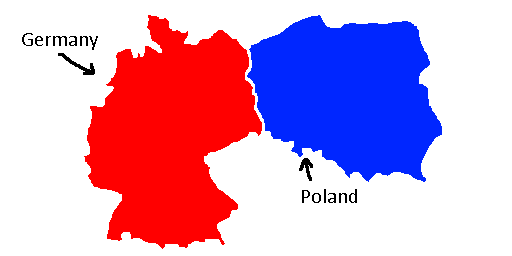
hope this information makes things clearer!
I see, yeah that makes it a lot clearer, thanks. My suggested approach would be more or less the same as before. When loading the bitmap, in addition to creating a texture from it for display, also extract the color values into an array. So you will have two representations of the bitmap, one for display and one for lookup. Then, when the mouse moves over the image, use the mouse position (translated to be relative to where you display the image) to do an array lookup and find the color that’s below the mouse cursor. Then, you can either do a linear search over all your Province objects to find the one with the matching color, or you could use a hashmap (e.g. std::unordered_map) to map from color value to pointer to Province.
1 Like
sounds good! i’ll try to implement it right away!
1 Like
if i store it in an array the limit ranges anywhere from around 200k-400k items all the way to 4 billion items but i think i can get away by putting a limit in place
An alternative to have the image’s pixels in an array is to instead load the image into an SDL_Surface, store that surface and then do a lookup on the surface using the SDL_GetRGBA function, which gives you a color of the pixel on a specific x- and y coordinate on the surface.
If you’re using SDL3 you also have the SDL_ReadSurfacePixel function.
If the retrieved pixel color’s alpha is 0 (so transparent pixel), the mouse pointer is not touching the land part of the image, if the alpha is not 0, the mouse pointer is touching the land part.
You can also check if a pixel is red, blue etc, if needed, to differentiate between the land parts, if they are in the same image.
So it’s basically a pixel-perfect check on the image/surface.
I had some time over so I decided to write a little test application for detecting pixel colors on a surface, based on where the mouse pointer is on the surface.
I’ve used SDL3 for it, and here’s the source code:
Summary
#define SDL_MAIN_USE_CALLBACKS
#include <SDL3/SDL.h>
#include <SDL3/SDL_main.h>
#include <SDL3_image/SDL_image.h>

#define WINDOW_WIDTH	(800)
#define WINDOW_HEIGHT	(600)

struct SAppContext
{
	SDL_Window*		m_pWindow			= nullptr;
	SDL_Renderer*	m_pRenderer			= nullptr;
	SDL_Surface*	m_pSurface			= nullptr;
	SDL_Texture*	m_pTexture			= nullptr;
	SDL_FRect		m_TextureRect		= {0.0f, 0.0f, 0.0f, 0.0f};
	SDL_Color		m_PixelColor		= {0, 0, 0, 0};
	SDL_FPoint		m_MousePosition		= {0.0f, 0.0f};
	SDL_AppResult	m_ApplicationResult	= SDL_APP_CONTINUE;
};

void Update(SAppContext* AppContext)
{
	SDL_GetMouseState(&AppContext->m_MousePosition.x, &AppContext->m_MousePosition.y);

	AppContext->m_PixelColor = {0, 0, 0, 0};
	if(SDL_PointInRectFloat(&AppContext->m_MousePosition, &AppContext->m_TextureRect))
	{
		const SDL_FPoint MousePositionInRect = {AppContext->m_MousePosition.x - AppContext->m_TextureRect.x, AppContext->m_MousePosition.y - AppContext->m_TextureRect.y};
		SDL_ReadSurfacePixel(AppContext->m_pSurface, (int)MousePositionInRect.x, (int)MousePositionInRect.y, &AppContext->m_PixelColor.r, &AppContext->m_PixelColor.g, &AppContext->m_PixelColor.b, &AppContext->m_PixelColor.a);
	}
}

void Render(SAppContext* AppContext)
{
	SDL_Renderer* Renderer = AppContext->m_pRenderer;

	SDL_SetRenderDrawColor(Renderer, 0, 0, 0, SDL_ALPHA_OPAQUE);
	SDL_RenderClear(Renderer);
	{
		SDL_RenderTexture(Renderer, AppContext->m_pTexture, nullptr, &AppContext->m_TextureRect);

		const SDL_Color PixelColor = ((AppContext->m_PixelColor.a == 0) ? SDL_Color{255, 255, 255, SDL_ALPHA_OPAQUE} : AppContext->m_PixelColor);
		SDL_SetRenderDrawColor(Renderer, PixelColor.r, PixelColor.g, PixelColor.b, PixelColor.a);
		SDL_RenderRect(Renderer, &AppContext->m_TextureRect);
	}
	SDL_RenderPresent(AppContext->m_pRenderer);
}

SDL_AppResult SDL_Fail()
{
	SDL_ShowSimpleMessageBox(SDL_MESSAGEBOX_ERROR, "Error", SDL_GetError(), nullptr);

	return SDL_APP_FAILURE;
}

SDL_AppResult SDL_AppInit(void** AppState, int Argc, char* Argv[])
{
	if(!SDL_Init(SDL_INIT_VIDEO))
		return SDL_Fail();

	SDL_Window* Window = SDL_CreateWindow("Surface pixel color", WINDOW_WIDTH, WINDOW_HEIGHT, SDL_WINDOW_HIDDEN);
	if(!Window)
		return SDL_Fail();

	SDL_Renderer* Renderer = SDL_CreateRenderer(Window, nullptr);
	if(!Renderer)
		return SDL_Fail();

	SDL_SetRenderVSync(Renderer, 1);
	SDL_SetRenderDrawColor(Renderer, 0, 0, 0, SDL_ALPHA_OPAQUE);

	SDL_ShowWindow(Window);

	SDL_Surface* Surface = IMG_Load("Lands.png");
	if(!Surface)
		return SDL_Fail();

	SDL_Texture* Texture = SDL_CreateTextureFromSurface(Renderer, Surface);
	if(!Texture)
		return SDL_Fail();

	SDL_FPoint TextureSize = {0.0f, 0.0f};
	if(!SDL_GetTextureSize(Texture, &TextureSize.x, &TextureSize.y))
		return SDL_Fail();

	SAppContext* AppContext		= new SAppContext;
	AppContext->m_pWindow		= Window;
	AppContext->m_pRenderer		= Renderer;
	AppContext->m_pSurface		= Surface;
	AppContext->m_pTexture		= Texture;
	AppContext->m_TextureRect	= {(WINDOW_WIDTH * 0.5f) - (TextureSize.x * 0.5f), (WINDOW_HEIGHT * 0.5f) - (TextureSize.y * 0.5f), TextureSize.x, TextureSize.y};

	*AppState = AppContext;

	return SDL_APP_CONTINUE;
}

SDL_AppResult SDL_AppIterate(void* AppState)
{
	SAppContext* AppContext = (SAppContext*)AppState;

	if(!AppContext)
		return SDL_APP_FAILURE;

	Update(AppContext);
	Render(AppContext);

	return AppContext->m_ApplicationResult;
}

SDL_AppResult SDL_AppEvent(void* AppState, SDL_Event* Event)
{
	SAppContext* AppContext = (SAppContext*)AppState;

	if(!AppContext)
		return SDL_APP_FAILURE;

	if(Event->type == SDL_EVENT_QUIT)
		AppContext->m_ApplicationResult = SDL_APP_SUCCESS;

	return AppContext->m_ApplicationResult;
}

void SDL_AppQuit(void* AppState, SDL_AppResult Result)
{
	SAppContext* AppContext = (SAppContext*)AppState;

	if(AppContext)
	{
		SDL_DestroyTexture(AppContext->m_pTexture);
		AppContext->m_pTexture = nullptr;

		SDL_DestroySurface(AppContext->m_pSurface);
		AppContext->m_pSurface = nullptr;

		SDL_DestroyRenderer(AppContext->m_pRenderer);
		AppContext->m_pRenderer = nullptr;

		SDL_DestroyWindow(AppContext->m_pWindow);
		AppContext->m_pWindow = nullptr;

		delete AppContext;
		AppContext = nullptr;
	}

	SDL_Quit();
}
Whenever the mouse pointer is inside the texture rectangle, the code checks if the mouse pointer is touching a transparent pixel or a non-transparent pixel. The rectangle that is rendered around the texture is then colored depending on that, a white rectangle if the mouse pointer is touching a transparent pixel and red/blue if a non-transparent pixel is touched.
The interesting part of the code is in the Update function, where the SDL_ReadSurfacePixel function is used whenever the mouse pointer is inside the texture rectangle.
Result:

4 Likes
that could also work but the data is just the raw color values but the displayed result is varying between who owns what, thanks for making one of my dreams come true!
I don’t quite understand what you mean by raw color values.
If your image(s) does not contain an alpha channel, so not transparent pixels, and instead has white pixels outside of the land parts, you can use my suggestion and check the color of the pixel, and instead check if the pixel is white.
If the pixel is white, it means the mouse pointer is not hovering a land part. If the pixel is not white, it means the mouse pointer is hovering a land part, which is a non-white color.
the raw color is the color that isn’t displayed to the user but still exists as an immutable image where the renderer pulls the colors and compares the color to existing provinces on the map by the color id and then draws it as another color depending on what country controls/owns it and it always ignores the color black because it’s the outline of course
I see. So you have 1 image which is a country, let’s say Germany. Then you have another image, which is a bitmap that the application compares pixel colors to?
Is your goal to render countries in different colors depending on which player who owns it? So a player might own Germany and Poland and those two countries should be colored red.
Is this correct?
almost, but it’s all one image
here’s a diagram of the internal process i plan on to implement in the game

I understand.
And there will be clicking involved? So a player clicks on a part of the map to select it and then owns it?
Then when a click occurs, the code does a look-up on the ‘pre-render passing’ image to see if the player has actually clicked on a valid part, so not in the ocean for example.
yes it looks up where the press happened in the pre-render pass and then highlights the province in a faintly lighter color, the naval provinces are defined by either using the mod menu to change the identity of the province or directly modifying the .csv file
How are you checking against the pre-render-pass image? Are you checking pixel per pixel?
i didn’t get to that part yet since this drawing function decided to take the time off
void drawMap(SDL_Renderer* renderer, Map* map) {
    SDL_Surface* mapSurf = map->mapimageData;
    SDL_Texture* mapText = SDL_CreateTextureFromSurface(renderer, mapSurf);
    SDL_FRect dest = {0.0f, 0.0f, (float)mapText->w, (float)mapText->h};
    SDL_DestroySurface(mapSurf);
    SDL_RenderTexture(renderer, mapText, NULL, &dest);
    SDL_DestroyTexture(mapText);
}
it’s basically the exact same as this function:
void drawImage(SDL_Renderer* renderer, int x, int y, const char* path) {
    SDL_Surface* imgSurf = IMG_Load(path);
    SDL_Texture* imgText = SDL_CreateTextureFromSurface(renderer, imgSurf);
    SDL_FRect dest = {(float)x, (float)y, (float)imgText->w, (float)imgText->h};
    SDL_DestroySurface(imgSurf);
    SDL_RenderTexture(renderer, imgText, NULL, &dest);
    SDL_DestroyTexture(imgText);
}
apparently my code crashes for some reason whenever i put an error check after pressing “new game”, might as well be this function
void loadMap(const char* mapname) {
    char* dir;
    strncat(dir, "maps/", 1);
    strncat(dir, mapname, 1);
    strncat(dir, "/map.bmp", 1);
    mapimageGlobalData = IMG_Load(dir);
}
it’s appropriate if i also give some classes to work off of
class MapMetadata {
public:
    MapMetadata(const char* mmn, const char* mma, const char* mmd);
    const char* name;
    const char* author;
    const char* desc;
};
class Resource {
    const char* name;
    uint8_t reservedTypeID;
};
class Country {
    const char* tag;
    uint8_t group;
    float civBonus;
};
class Province {
    Resource resources[16];
    Country* owner;
    Country* controller;
    Country claimants[64];
    unsigned char colorID;
    const char* name;
    bool isCapital;
};
class Map {
public:
    Map(SDL_Surface* mimg, MapMetadata* md);
    SDL_Surface* mapimageData;
    MapMetadata* mapMD;
    Province provinces[];
};
The way you’re using strncat in the loadMap function isn’t correct.
Here’s the function signature:
char* strncat(char* destination, const char* source, size_t num);
strncat expects a pointer to a valid string array.
When you’re using strncat, you’re passing in dir, which is pointing to some garbage value (since you don’t initialize it to something). It’s also just a pointer, and not an array of chars.
You’re also passing in 1 as the third argument. The third argument is the number of characters to append from source to destination, which means that strncat will only append 1 character.
You need to use it like this:
char myString[64];
strncat(myString, "Some text", 9);
This will copy 9 characters from source and append it into myString, so myString will contain “Some text" in this case.
It looks like you want to format a string so it’s easier to use the sprintf_s function for this.
Example:
char path[64];
sprintf_s(path, sizeof(path), "maps/%s/map.bmp", mapname);

mapimageGlobalData = IMG_Load(path);
1 Like