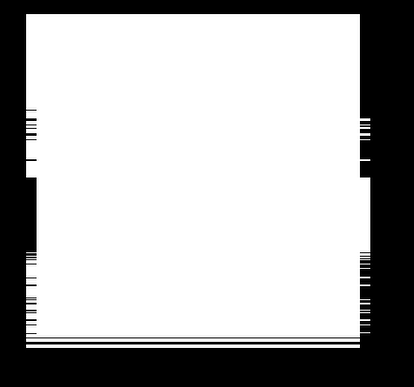
Hey all, I’ve been trying to learn SDL3 for some time but I am stuck on one seemingly simple problem. In my pong game, the ball is a 32x32 white pixelart square png, made and exported with aseprite. As the ball is moving on the screen, occasional “glitches“ happen. In these glitches, horizontal lines of the image seem to move/become smaller, leaving tiny holes in the side of the ball. Ive made an image to show how this looks, since when screenshot, the ball looks fine. It can be seen on video however.
recreated image of problem:

I cannot upload a video of the problem, because this account is new. As I mentioned screenshotting shows a perfect image of the ball.
I made a small example code showing this, so you don’t have to go through my entire project. It is the code from “scaling-textures.c“ slightly changed to show the problem:
/*
 * This example creates an SDL window and renderer, and then draws some
 * textures to it every frame.
 *
 * This code is public domain. Feel free to use it for any purpose!
 */

#define SDL_MAIN_USE_CALLBACKS 1  /* use the callbacks instead of main() */
#include <SDL3/SDL.h>
#include <SDL3/SDL_main.h>

/* We will use this renderer to draw into this window every frame. */
static SDL_Window *window = NULL;
static SDL_Renderer *renderer = NULL;
static SDL_Texture *texture = NULL;
static int texture_width = 0;
static int texture_height = 0;

#define WINDOW_WIDTH 320
#define WINDOW_HEIGHT 180
/* This function runs once at startup. */
SDL_AppResult SDL_AppInit(void **appstate, int argc, char *argv[])
{
    SDL_Surface *surface = NULL;
    char *png_path = NULL;

    SDL_SetAppMetadata("Example Renderer Scaling Textures", "1.0", "com.example.renderer-scaling-textures");

    if (!SDL_Init(SDL_INIT_VIDEO)) {
        SDL_Log("Couldn't initialize SDL: %s", SDL_GetError());
        return SDL_APP_FAILURE;
    }

    if (!SDL_CreateWindowAndRenderer("examples/renderer/scaling-textures", WINDOW_WIDTH, WINDOW_HEIGHT, SDL_WINDOW_RESIZABLE, &window, &renderer)) {
        SDL_Log("Couldn't create window/renderer: %s", SDL_GetError());
        return SDL_APP_FAILURE;
    }
    SDL_SetRenderLogicalPresentation(renderer, WINDOW_WIDTH, WINDOW_HEIGHT, SDL_LOGICAL_PRESENTATION_INTEGER_SCALE);

    /* Textures are pixel data that we upload to the video hardware for fast drawing. Lots of 2D
       engines refer to these as "sprites." We'll do a static texture (upload once, draw many
       times) with data from a bitmap file. */

    /* SDL_Surface is pixel data the CPU can access. SDL_Texture is pixel data the GPU can access.
       Load a .png into a surface, move it to a texture from there. */
    SDL_asprintf(&png_path, "%simg/pongball.png", SDL_GetBasePath());  /* allocate a string of the full file path */
    surface = SDL_LoadPNG(png_path);
    if (!surface) {
        SDL_Log("Couldn't load bitmap: %s", SDL_GetError());
        return SDL_APP_FAILURE;
    }

    SDL_free(png_path);  /* done with this, the file is loaded. */

    texture_width = surface->w;
    texture_height = surface->h;

    texture = SDL_CreateTextureFromSurface(renderer, surface);
    if (!texture) {
        SDL_Log("Couldn't create static texture: %s", SDL_GetError());
        return SDL_APP_FAILURE;
    }
    if (!SDL_SetTextureScaleMode(texture, SDL_SCALEMODE_PIXELART))
    {
        SDL_Log("Scalemode does not work: %s", SDL_GetError());
        return SDL_APP_FAILURE;
    }

    SDL_DestroySurface(surface);  /* done with this, the texture has a copy of the pixels now. */
    return SDL_APP_CONTINUE;  /* carry on with the program! */
}

/* This function runs when a new event (mouse input, keypresses, etc) occurs. */
SDL_AppResult SDL_AppEvent(void *appstate, SDL_Event *event)
{
    if (event->type == SDL_EVENT_QUIT) {
        return SDL_APP_SUCCESS;  /* end the program, reporting success to the OS. */
    }
    return SDL_APP_CONTINUE;  /* carry on with the program! */
}

//quick variables for easy viewing
float x = 0;
float y = 0;
float xvel = 1;
float yvel = 1;
float speed = 1;
/* This function runs once per frame, and is the heart of the program. */
SDL_AppResult SDL_AppIterate(void *appstate)
{
    SDL_FRect dst_rect;

    /* change x and y velocity based on screen edges */
    if (x + 64 >= WINDOW_WIDTH) {
        xvel = -1;
    } else if (x <= 0) {
        xvel = 1;
    }
    if (y + 64 >= WINDOW_HEIGHT) {
        yvel = -1;
    } else if (y <= 0) {
        yvel = 1;
    }

    /* as you can see from this, rendering draws over whatever was drawn before it. */
    SDL_SetRenderDrawColor(renderer, 0, 0, 0, SDL_ALPHA_OPAQUE);  /* black, full alpha */
    SDL_RenderClear(renderer);  /* start with a blank canvas. */

    //calculate new x and y values based on their velocity, speed and old location
    x = x + xvel*speed;
    y = y + yvel*speed;
    /* update location of image */
    dst_rect.w = 64;
    dst_rect.h = 64;
    dst_rect.x = SDL_roundf(x); //rounding coordinates just to be sure
    dst_rect.y = SDL_roundf(y);
    SDL_RenderTexture(renderer, texture, NULL, &dst_rect);

    SDL_RenderPresent(renderer);  /* put it all on the screen! */

    return SDL_APP_CONTINUE;  /* carry on with the program! */
}

/* This function runs once at shutdown. */
void SDL_AppQuit(void *appstate, SDL_AppResult result)
{
    SDL_DestroyTexture(texture);
    /* SDL will clean up the window/renderer for us. */
}