I’m developing a game demo using sdl2 (using most recent version I think). The map consists of a lot of 40x40 tiles. when player moves around, the map scrolls. the player and monsters are all animated sprites with multiple frames.
Here’s what I’m doing. In every frame, I call texture-copy on every visible tile, and I do the same to sprites. When game set to fullscreen, there can be a huge number of copy calls, the performance becomes an issue.
my 1st question is, since most of the map tiles remains on screen (just coords updated), is there any way I can reduce the texture copy calls, just update some coords?
next question is, for a sprite, if the next frame is the same as the last one, is there any way we can skip the texture copy?
Are you using the hardware accelerated 2D renderer? Because if you are, you should be able to draw thousands of tiles per frame without performance issue.
Yes. The render was inited with SDL_RENDERER_ACCELERATED.
the demo works smoothly when num of sprites is small. but if there’re hundreds of sprites on screen, the fps drops to around 10. I want to know whether the way I did with tiles and sprites is correct or not (liked mentioned above).
BTW, I’m working on an old pc with GTX960ti video card.
Something must be seriously wrong if your game is unable to perform a few hundred copies of such microscopic tiles and sprites in a reasonable amount of time, with SDL_RENDERER_ACCELERATED. Because on that GPU, it should be able to render thousands of them in just 1ms, let alone in 16.7ms to maintain 60fps.
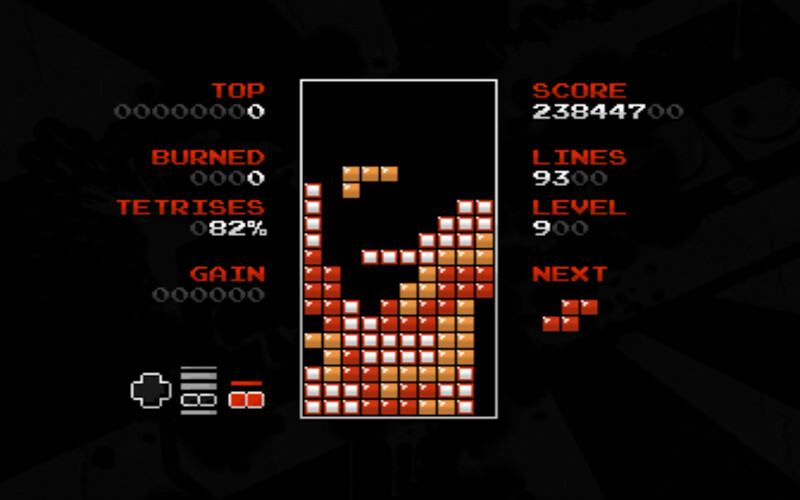
We can easily test this, for example, by using my game — Fairtris 2 UC (link to download Fairtris 2.1.2). There’s no need to install it — simply download the archive, unpack it, and run the executable file.
This game renders each frame from scratch, using a small back buffer to render the frame, and then that buffer is painted onto the window texture. During gameplay:
every letter and digit of the counters, every brick of the stack and the currently falling piece, and each of the buttons on the gamepad thumbnail are copied to the buffer texture using SDL_RenderCopy. As you can see in the screenshot above, there can be over a hundred of them. Check if it works for you.
I’ll just add that this game runs flawlessly at 60fps and uses only about 5% of the CPU time on my old laptop, a ThinkPad X201 Tablet (manufactured in 2014) with Windows 10, which has a terrible integrated GPU.
As others have said, your GPU should be easily capable of rendering a ton of tiles and sprites every frame without breaking a sweat.
For optimizing tile & sprite drawing, the main thing to consider is batching - are all the tiles part of the same texture? Are the sprites combined into a texture atlas? Are you changing color modulation or other settings between copy calls?If each copy call uses a different texture or settings, it introduces overhead. Whereas if all the copy calls are using the same texture, SDL can combine it into a single draw call, which is very efficient.
I saw in another thread here that someone was creating & destroying a texture inside the “drawImage” function, so creating&destroying for each single invocation, based on some example code. Are you perhaps using similar example code by any chance? That would definitely tank your performance. Textures should be created when loading the map and then reused while the game is running.