[Solved] How to use the SDL3 callback app structure in Python?

Hi. How to use the SDL3 callback app structure in Python? Is it possible?

I can write in C:

#define SDL_MAIN_USE_CALLBACKS 1  /* use the callbacks instead of main() */

But how to activate it in Python?

pip install PySDL3

main.py

import sdl3

print(dir(sdl3))

I’ve found SDL_EnterAppMainCallbacks in the output above but I don’t know how to use it. I want to rewrite the official template to Python: SDL/examples/template.c at main · libsdl-org/SDL · GitHub

1 Like

The emccue’s answer on Discord:

Well, you have two options

  1. Reimplement what the callbacks do in python - python already owns the main function so there isn’t much you can do. time to write while True:
  2. Start your program in C and initialize python through its C api

Topic on GitHub

2 Likes

Using Function prototypes, it’s possible to use SDL_EnterAppMainCallbacks in pure Python code.

Example code:

#!/usr/bin/env python3
import ctypes
import dataclasses
import sys
import time

import sdl3


@dataclasses.dataclass
class AppState:
    window: ctypes.POINTER(sdl3.SDL_Window)
    renderer: ctypes.POINTER(sdl3.SDL_Renderer)


def SDL_AppEvent(c_appstate, c_event: ctypes.POINTER(sdl3.SDL_Event)) -> sdl3.SDL_AppResult:  # event: ctypes.POINTER(sdl3.SDL_Event)
    event: sdl3.SDL_Event = c_event.contents
    # appstate: AppState = ctypes.cast(c_appstate, ctypes.POINTER(ctypes.py_object)).contents.value
    if event.type == sdl3.SDL_EVENT_QUIT:
        return sdl3.SDL_APP_SUCCESS
    return sdl3.SDL_APP_CONTINUE


def SDL_AppIterate(c_appstate) -> sdl3.SDL_AppResult:
    appstate: AppState = ctypes.cast(c_appstate, ctypes.POINTER(ctypes.py_object)).contents.value
    if not sdl3.SDL_SetRenderDrawColor(appstate.renderer, int(time.time() * 255 / 2) % 256, 0, 0, sdl3.SDL_ALPHA_OPAQUE):
        print("SDL_SetRenderDrawColorFloat failed")
        return sdl3.SDL_APP_FAILURE
    if not sdl3.SDL_RenderClear(appstate.renderer):
        print("SDL_RenderClear failed")
        return sdl3.SDL_APP_FAILURE
    if not sdl3.SDL_RenderPresent(appstate.renderer):
        print("SDL_RenderPresent failed")
        return sdl3.SDL_APP_FAILURE
    return sdl3.SDL_APP_CONTINUE


def SDL_AppInit(c_appstate, argc, argv) -> sdl3.SDL_AppResult:  # argc: int, argv: ctypes.POINTER[ctypes.c_char_p]
    p_window = ctypes.POINTER(sdl3.SDL_Window)()
    p_renderer = ctypes.POINTER(sdl3.SDL_Renderer)()
    if not sdl3.SDL_CreateWindowAndRenderer(b"Hello world!", 640, 480, 0, ctypes.pointer(p_window), ctypes.pointer(p_renderer)):
        print("sdl3.SDL_CreateWindowAndRenderer failed")
        return sdl3.SDL_APP_FAILURE
    state = AppState(window=p_window.contents, renderer=p_renderer.contents)
    c_appstate[0] = ctypes.cast(ctypes.pointer(ctypes.py_object(state)), ctypes.c_void_p)
    return sdl3.SDL_APP_CONTINUE


def SDL_AppQuit(c_appstate, result) -> None:  # ctypes.POINTER[sdl3.SDL_AppResult]
    appstate: AppState = ctypes.cast(c_appstate, ctypes.POINTER(ctypes.py_object)).contents.value
    sdl3.SDL_DestroyRenderer(appstate.renderer)
    sdl3.SDL_DestroyWindow(appstate.window)


def main():
    c_SDL_AppInit_cfunctype = ctypes.CFUNCTYPE(sdl3.SDL_AppResult, ctypes.POINTER(ctypes.c_void_p), ctypes.c_int, ctypes.POINTER(ctypes.c_char_p))
    c_SDL_AppIterate_cfunctype = ctypes.CFUNCTYPE(sdl3.SDL_AppResult, ctypes.c_void_p)
    c_SDL_AppEvent_cfunctype = ctypes.CFUNCTYPE(sdl3.SDL_AppResult, ctypes.c_void_p, ctypes.POINTER(sdl3.SDL_Event))
    c_SDL_AppQuit_cfunctype = ctypes.CFUNCTYPE(None, ctypes.c_void_p, sdl3.SDL_AppResult)

    c_arg_array_t = ctypes.c_char_p * (len(sys.argv) + 0)
    c_args = c_arg_array_t(*[ctypes.c_char_p(a.encode()) for a in sys.argv])

    result = sdl3.SDL_EnterAppMainCallbacks(ctypes.c_int(len(sys.argv)), c_args,
                                            c_SDL_AppInit_cfunctype(SDL_AppInit),
                                            c_SDL_AppIterate_cfunctype(SDL_AppIterate),
                                            c_SDL_AppEvent_cfunctype(SDL_AppEvent),
                                            c_SDL_AppQuit_cfunctype(SDL_AppQuit))
    return result


if __name__ == "__main__":
    raise SystemExit(main())
2 Likes

There was a bug related to the appstate in my previous example.
The AppState/ctypes.py_object object was created and released in SDL_AppInit.
When running in debug mode, the example failed when accessing the appstate argument in the SDL_AppEvent and SDL_AppIterate callback functions.

#!/usr/bin/env python3
import ctypes
import dataclasses
import sys
import time
import typing

import sdl3


@dataclasses.dataclass
class AppState:
    window: ctypes.POINTER(sdl3.SDL_Window)
    renderer: ctypes.POINTER(sdl3.SDL_Renderer)


state: typing.Optional[AppState] = None


def SDL_AppEvent(c_appstate, c_event: ctypes.POINTER(sdl3.SDL_Event)) -> sdl3.SDL_AppResult:
    event: sdl3.SDL_Event = c_event.contents
    if event.type == sdl3.SDL_EVENT_QUIT:
        return sdl3.SDL_APP_SUCCESS
    return sdl3.SDL_APP_CONTINUE


def SDL_AppIterate(c_appstate) -> sdl3.SDL_AppResult:
    if not sdl3.SDL_SetRenderDrawColor(state.renderer, int(time.time() * 255 / 2) % 256, 0, 0, sdl3.SDL_ALPHA_OPAQUE):
        print("SDL_SetRenderDrawColorFloat failed")
        return sdl3.SDL_APP_FAILURE
    if not sdl3.SDL_RenderClear(state.renderer):
        print("SDL_RenderClear failed")
        return sdl3.SDL_APP_FAILURE
    if not sdl3.SDL_RenderPresent(state.renderer):
        print("SDL_RenderPresent failed")
        return sdl3.SDL_APP_FAILURE
    return sdl3.SDL_APP_CONTINUE


def SDL_AppInit(c_appstate, argc, argv) -> sdl3.SDL_AppResult:
    p_window = ctypes.POINTER(sdl3.SDL_Window)()
    p_renderer = ctypes.POINTER(sdl3.SDL_Renderer)()
    if not sdl3.SDL_CreateWindowAndRenderer(b"Hello world!", 640, 480, 0, ctypes.pointer(p_window), ctypes.pointer(p_renderer)):
        print("sdl3.SDL_CreateWindowAndRenderer failed")
        return sdl3.SDL_APP_FAILURE
    global state
    state = AppState(window=p_window.contents, renderer=p_renderer.contents)
    c_appstate[0] = ctypes.cast(ctypes.pointer(ctypes.py_object(state)), ctypes.c_void_p)
    return sdl3.SDL_APP_CONTINUE


def SDL_AppQuit(c_appstate, result) -> None:  # ctypes.POINTER[sdl3.SDL_AppResult]
    appstate: AppState = ctypes.cast(c_appstate, ctypes.POINTER(ctypes.py_object)).contents.value
    sdl3.SDL_DestroyRenderer(appstate.renderer)
    sdl3.SDL_DestroyWindow(appstate.window)


def main():
    c_SDL_AppInit_cfunctype = ctypes.CFUNCTYPE(sdl3.SDL_AppResult, ctypes.POINTER(ctypes.c_void_p), ctypes.c_int, ctypes.POINTER(ctypes.c_char_p))
    c_SDL_AppIterate_cfunctype = ctypes.CFUNCTYPE(sdl3.SDL_AppResult, ctypes.c_void_p)
    c_SDL_AppEvent_cfunctype = ctypes.CFUNCTYPE(sdl3.SDL_AppResult, ctypes.c_void_p, ctypes.POINTER(sdl3.SDL_Event))
    c_SDL_AppQuit_cfunctype = ctypes.CFUNCTYPE(None, ctypes.c_void_p, sdl3.SDL_AppResult)

    c_arg_array_t = ctypes.c_char_p * (len(sys.argv) + 0)
    c_args = c_arg_array_t(*[ctypes.c_char_p(a.encode()) for a in sys.argv])

    result = sdl3.SDL_EnterAppMainCallbacks(ctypes.c_int(len(sys.argv)), c_args,
                                            c_SDL_AppInit_cfunctype(SDL_AppInit),
                                            c_SDL_AppIterate_cfunctype(SDL_AppIterate),
                                            c_SDL_AppEvent_cfunctype(SDL_AppEvent),
                                            c_SDL_AppQuit_cfunctype(SDL_AppQuit))
    return result


if __name__ == "__main__":
    raise SystemExit(main())
2 Likes

Thanks a lot!

Aermoss answered here:

Thank you for pointing out! I implemented ‘SDL_main_impl.h’ in version 0.8.1b0, you can now use callbacks like this:

import ctypes, os

os.environ["SDL_MAIN_USE_CALLBACKS"] = "1"

import sdl3

@sdl3.SDL_AppInit_func
def SDL_AppInit(appstate: sdl3.LP_c_void_p, argc: ctypes.c_int, argv: sdl3.LP_c_char_p) -> sdl3.SDL_AppResult: ...

@sdl3.SDL_AppIterate_func
def SDL_AppIterate(appstate: ctypes.c_void_p) -> sdl3.SDL_AppResult: ...

@sdl3.SDL_AppEvent_func
def SDL_AppEvent(appstate: ctypes.c_void_p, event: sdl3.LP_SDL_Event) -> sdl3.SDL_AppResult: ...

@sdl3.SDL_AppQuit_func
def SDL_AppQuit(appstate: ctypes.c_void_p, result: sdl3.SDL_AppResult) -> None: ...
1 Like

Aermoss published a slightly modified version of madebr’s example here:

import os, ctypes, time

os.environ["SDL_MAIN_USE_CALLBACKS"] = "1"

import sdl3

class AppState(ctypes.Structure):
    _fields_ = [
        ("window", ctypes.POINTER(sdl3.SDL_Window)),
        ("renderer", ctypes.POINTER(sdl3.SDL_Renderer))
    ]

@sdl3.SDL_AppInit_func
def SDL_AppInit(appstate: sdl3.LP_c_void_p, argc: ctypes.c_int, argv: sdl3.LP_c_char_p) -> sdl3.SDL_AppResult:
    state = AppState()

    if not sdl3.SDL_Init(sdl3.SDL_INIT_VIDEO):
        sdl3.SDL_Log("Couldn't initialize SDL: %s", sdl3.SDL_GetError())
        return sdl3.SDL_APP_FAILURE

    if not sdl3.SDL_CreateWindowAndRenderer("Hello, World!".encode(), 640, 480, 0, ctypes.byref(state.window), ctypes.byref(state.renderer)):
        sdl3.SDL_Log("Couldn't create window/renderer: %s", sdl3.SDL_GetError())
        return sdl3.SDL_APP_FAILURE

    appstate[0] = ctypes.cast(ctypes.pointer(state), ctypes.c_void_p)
    return sdl3.SDL_APP_CONTINUE

@sdl3.SDL_AppEvent_func
def SDL_AppEvent(appstate: ctypes.c_void_p, event: sdl3.LP_SDL_Event) -> sdl3.SDL_AppResult:
    if sdl3.SDL_DEREFERENCE(event).type == sdl3.SDL_EVENT_QUIT:
        return sdl3.SDL_APP_SUCCESS
    
    return sdl3.SDL_APP_CONTINUE

@sdl3.SDL_AppIterate_func
def SDL_AppIterate(appstate: ctypes.c_void_p) -> sdl3.SDL_AppResult:
    state: AppState = sdl3.SDL_DEREFERENCE(ctypes.cast(appstate, ctypes.POINTER(AppState)))
    sdl3.SDL_SetRenderDrawColor(state.renderer, int(time.time() * 255 / 2) % 256, 0, 0, sdl3.SDL_ALPHA_OPAQUE)
    sdl3.SDL_RenderClear(state.renderer)
    sdl3.SDL_RenderPresent(state.renderer)
    return sdl3.SDL_APP_CONTINUE

@sdl3.SDL_AppQuit_func
def SDL_AppQuit(appstate: ctypes.c_void_p, result: sdl3.SDL_AppResult) -> None:
    ... # SDL will clean up the window/renderer for us.
1 Like

Simplified version of the code above:

py install PySDL3

main.py

import os, ctypes, time

os.environ["SDL_MAIN_USE_CALLBACKS"] = "1"

import sdl3

renderer = ctypes.POINTER(sdl3.SDL_Renderer)()
window = ctypes.POINTER(sdl3.SDL_Window)()

@sdl3.SDL_AppInit_func
def SDL_AppInit(appstate, argc, argv):
    if not sdl3.SDL_Init(sdl3.SDL_INIT_VIDEO):
        sdl3.SDL_Log("Couldn't initialize SDL: %s", sdl3.SDL_GetError())
        return sdl3.SDL_APP_FAILURE

    if not sdl3.SDL_CreateWindowAndRenderer("Hello, World!".encode(), 640, 480, 0, window, renderer):
        sdl3.SDL_Log("Couldn't create window/renderer: %s", sdl3.SDL_GetError())
        return sdl3.SDL_APP_FAILURE

    return sdl3.SDL_APP_CONTINUE

@sdl3.SDL_AppEvent_func
def SDL_AppEvent(appstate, event):
    if sdl3.SDL_DEREFERENCE(event).type == sdl3.SDL_EVENT_QUIT:
        return sdl3.SDL_APP_SUCCESS
    
    return sdl3.SDL_APP_CONTINUE

@sdl3.SDL_AppIterate_func
def SDL_AppIterate(appstate):
    sdl3.SDL_SetRenderDrawColor(renderer, int(time.time() * 255 / 2) % 256, 0, 0, sdl3.SDL_ALPHA_OPAQUE)
    sdl3.SDL_RenderClear(renderer)
    sdl3.SDL_RenderPresent(renderer)
    return sdl3.SDL_APP_CONTINUE

@sdl3.SDL_AppQuit_func
def SDL_AppQuit(appstate, result):
    ... # SDL will clean up the window/renderer for us.

Topic with example links in PySDL3: https://github.com/Aermoss/PySDL3/issues/21

My topics with examples for beginners:

Sprite animation (native PNG from SDL 3.3)

It plays a sprite animation from the free asset pack: Tiny Swords by Pixel Frog

This example uses native SDL 3.3 (not SDL3_image):

    texturePath = "./assets/sprites/warrior/idle.png".encode()
    surface = sdl3.SDL_LoadPNG(texturePath)
    if not surface:
        sdl.SDL_Log("PNG load failed: %s: %s".encode() % (texturePath, sdl3.SDL_GetError()))
        return sdl3.SDL_APP_FAILURE

    spriteTexture = sdl3.SDL_CreateTextureFromSurface(renderer, surface)
    sdl3.SDL_DestroySurface(surface)

Source code: sprite-animation-native-png-pysdl3-python.zip (49.5 KB)

pip install PySDL3
py main.py

Console output:

Compiled SDL version: 3.3.2
Linked SDL version: 3.3.2

sprite-animation-pysdl3

C version of the example above:

The following example is the same as above but it uses SDL3_image:

    texturePath = "./assets/sprites/warrior/idle.png".encode()
    spriteTexture = sdl3.IMG_LoadTexture(renderer, texturePath)
    if not spriteTexture:
        sdl3.SDL_Log("Error: %s".encode() % sdl3.SDL_GetError())
        return sdl3.SDL_APP_FAILURE

Source code: sprite-animation-sdl-image-png-pysdl3-python.zip (49.6 KB)

pip install PySDL3
py main.py

Console output:

Compiled SDL version: 3.3.2
Linked SDL version: 3.3.2
SDL3_image version: 3.2.4

sprite-animation-pysdl3

C version of the example above:

Another a very big change was made in SDL 3.3 and SDL3_mixer 3.1. But it works with SDL 3.2.28 and SDL_mixer 3.0.0. This code does not work anymore with PySDL 0.9.9b1: play-sound-by-click-pysdl3-python.zip (352.0 KB)

# pip install PySDL3
# py main.py

import ctypes
import os

os.environ["SDL_MAIN_USE_CALLBACKS"] = "1"
os.environ["SDL_RENDER_DRIVER"] = "opengl"

import sdl3

renderer = ctypes.POINTER(sdl3.SDL_Renderer)()
window = ctypes.POINTER(sdl3.SDL_Window)()
wave = ctypes.POINTER(sdl3.Mix_Chunk)()

@sdl3.SDL_AppInit_func
def SDL_AppInit(appstate, argc, argv):
    global wave

    if not sdl3.SDL_Init(sdl3.SDL_INIT_VIDEO | sdl3.SDL_INIT_AUDIO):
        sdl3.SDL_Log("Couldn't initialize SDL: %s".encode() % sdl3.SDL_GetError())
        return sdl3.SDL_APP_FAILURE

    if not sdl3.SDL_CreateWindowAndRenderer("Play a sound by click using PySDL3".encode(), 380, 380, 0, window, renderer):
        sdl3.SDL_Log("Couldn't create window/renderer: %s".encode() % sdl3.SDL_GetError())
        return sdl3.SDL_APP_FAILURE

    sdl3.SDL_SetRenderVSync(renderer, 1) # Turn on vertical sync

    spec = sdl3.SDL_AudioSpec()
    spec.freq = sdl3.MIX_DEFAULT_FREQUENCY
    spec.format = sdl3.MIX_DEFAULT_FORMAT
    spec.channels = sdl3.MIX_DEFAULT_CHANNELS

    # Open the audio device
    if not sdl3.Mix_OpenAudio(0, spec):
        sdl3.SDL_Log("Couldn't open an audio device: %s".encode() % SDL_GetError())
        return sdl3.SDL_APP_FAILURE

    # Load the WAV file
    soundFilePath = "./assets/audio/picked-coin-echo-2.wav".encode();
    wave = sdl3.Mix_LoadWAV(soundFilePath);
    if not wave:
        sdl3.SDL_Log("Couldn't open the file: %s".encode() % soundFilePath)
        sdl3.SDL_Log("Error: %s".encode() % sdl3.SDL_GetError())
        return sdl3.SDL_APP_FAILURE;

    return sdl3.SDL_APP_CONTINUE

@sdl3.SDL_AppEvent_func
def SDL_AppEvent(appstate, event):
    if sdl3.SDL_DEREFERENCE(event).type == sdl3.SDL_EVENT_QUIT:
        return sdl3.SDL_APP_SUCCESS
    elif sdl3.SDL_DEREFERENCE(event).type == sdl3.SDL_EVENT_MOUSE_BUTTON_DOWN:
        # Play the sound effect
        sdl3.Mix_PlayChannel(-1, wave, 0);

    return sdl3.SDL_APP_CONTINUE

@sdl3.SDL_AppIterate_func
def SDL_AppIterate(appstate):
    sdl3.SDL_SetRenderDrawColor(renderer, 210, 220, 210, sdl3.SDL_ALPHA_OPAQUE)
    sdl3.SDL_RenderClear(renderer)
    sdl3.SDL_RenderPresent(renderer)
    return sdl3.SDL_APP_CONTINUE

@sdl3.SDL_AppQuit_func
def SDL_AppQuit(appstate, result):
    global wave
    # SDL will clean up the window/renderer for us

    if wave:
        sdl3.Mix_FreeChunk(wave)
        wave = None

If you try to run it with PySDL 0.9.9b1 you will see this error:

    wave = ctypes.POINTER(sdl3.Mix_Chunk)()
                          ^^^^^^^^^^^^^^
AttributeError: module 'sdl3' has no attribute 'Mix_Chunk'

But this example works with SDL 3.2.28 and SDL3_mixer 3.0.0 in C: GitHub repository. You can test it in the browser (WASM) - click on the canvas to hear a sound. Console output for C app:

Compiled SDL3 version: 3.2.28
Linked SDL3 version:   3.3.4
SDL3_mixer version:    3.0.0

So, I have fixed the Play a sound by click example in Python: play-sound-pysdl-3.3.2-python.zip (352.4 KB)

# pip install PySDL3
# py main.py

import ctypes
import os

os.environ["SDL_MAIN_USE_CALLBACKS"] = "1"
os.environ["SDL_RENDER_DRIVER"] = "opengl"

import sdl3

renderer = ctypes.POINTER(sdl3.SDL_Renderer)()
window = ctypes.POINTER(sdl3.SDL_Window)()

mixer = ctypes.POINTER(sdl3.MIX_Mixer)()
audio = ctypes.POINTER(sdl3.MIX_Audio)()

@sdl3.SDL_AppInit_func
def SDL_AppInit(appstate, argc, argv):
    global mixer, audio

    sdl3.SDL_SetHint(b"SDL_MIXER_DISABLE_DRFLAC", b"1")
    sdl3.SDL_SetHint(b"SDL_MIXER_DISABLE_DRMP3", b"1")

    if not sdl3.SDL_Init(sdl3.SDL_INIT_VIDEO): # | sdl3.SDL_INIT_AUDIO
        sdl3.SDL_Log("Couldn't initialize SDL: %s".encode() % sdl3.SDL_GetError())
        return sdl3.SDL_APP_FAILURE

    title = "Play a sound by click using PySDL3".encode()
    if not sdl3.SDL_CreateWindowAndRenderer(title, 380, 380, 0, window, renderer):
        sdl3.SDL_Log("Couldn't create window/renderer: %s".encode() % sdl3.SDL_GetError())
        return sdl3.SDL_APP_FAILURE

    sdl3.SDL_SetRenderVSync(renderer, 1) # Turn on vertical sync

    # Get the compiled SDL version
    compiled = sdl3.SDL_VERSION
    compiled_major = sdl3.SDL_VERSIONNUM_MAJOR(compiled)
    compiled_minor = sdl3.SDL_VERSIONNUM_MINOR(compiled)
    compiled_micro = sdl3.SDL_VERSIONNUM_MICRO(compiled)
    print(f"Compiled SDL version: {compiled_major}.{compiled_minor}.{compiled_micro}")

    # Get the linked SDL version
    linked = sdl3.SDL_GetVersion()
    linked_major = sdl3.SDL_VERSIONNUM_MAJOR(linked)
    linked_minor = sdl3.SDL_VERSIONNUM_MINOR(linked)
    linked_micro = sdl3.SDL_VERSIONNUM_MICRO(linked)
    print(f"Linked SDL version:   {linked_major}.{linked_minor}.{linked_micro}")

    v = sdl3.MIX_Version()
    major = sdl3.SDL_VERSIONNUM_MAJOR(v)
    minor = sdl3.SDL_VERSIONNUM_MINOR(v)
    micro = sdl3.SDL_VERSIONNUM_MICRO(v)
    msg = f"SDL3_mixer version:   {major}.{minor}.{micro}".encode("utf-8")
    sdl3.SDL_Log(msg)

    if not sdl3.MIX_Init():
        sdl3.SDL_Log("MIX_Init failed: %s".encode() % sdl3.SDL_GetError())
        return sdl3.SDL_APP_FAILURE

    mixer = sdl3.MIX_CreateMixerDevice(sdl3.SDL_AUDIO_DEVICE_DEFAULT_PLAYBACK, None)
    if not mixer:
        err = sdl3.SDL_GetError().decode("utf-8")
        sdl3.SDL_Log(f"Couldn't create mixer: {err}".encode())
        return sdl3.SDL_APP_FAILURE

    mixerspec = sdl3.SDL_AudioSpec()
    sdl3.MIX_GetMixerFormat(mixer, ctypes.byref(mixerspec))
    fmt_name = sdl3.SDL_GetAudioFormatName(mixerspec.format).decode('utf-8')
    msg = f"Mixer is format {fmt_name}, {mixerspec.channels} channels, {mixerspec.freq} frequency".encode()
    sdl3.SDL_Log(msg)

    # --- Print available audio decoders ---
    sdl3.SDL_Log(b"Available MIXER decoders:")

    num_decoders = sdl3.MIX_GetNumAudioDecoders()
    if num_decoders < 0:
        err = sdl3.SDL_GetError().decode("utf-8")
        msg = f" - [error ({err})]".encode("utf-8")
        sdl3.SDL_Log(msg)
    elif num_decoders == 0:
        sdl3.SDL_Log(b" - [none]")
    else:
        for i in range(num_decoders):
            decoder_name = sdl3.MIX_GetAudioDecoder(i).decode("utf-8")
            msg = f" - {decoder_name}".encode("utf-8")
            sdl3.SDL_Log(msg)

    # --- Load audio file ---
    audiofname = b"./assets/audio/picked-coin-echo-2.wav"  # bytes for SDL
    audio = sdl3.MIX_LoadAudio(mixer, audiofname, False)
    if not audio:
        err = sdl3.SDL_GetError().decode("utf-8")
        msg = f"Failed to load '{audiofname.decode()}' ({err})".encode("utf-8")
        sdl3.SDL_Log(msg)
    else:
        audiospec = sdl3.SDL_AudioSpec()
        sdl3.MIX_GetAudioFormat(audio, ctypes.byref(audiospec))

        fmt_name = sdl3.SDL_GetAudioFormatName(audiospec.format).decode("utf-8")
        channels_text = "" if audiospec.channels == 1 else "s"
        msg = f"{audiofname.decode()}: {fmt_name}, {audiospec.channels} channel{channels_text}, {audiospec.freq} freq".encode("utf-8")
        sdl3.SDL_Log(msg)

    return sdl3.SDL_APP_CONTINUE

@sdl3.SDL_AppEvent_func
def SDL_AppEvent(appstate, event):
    if sdl3.SDL_DEREFERENCE(event).type == sdl3.SDL_EVENT_QUIT:
        return sdl3.SDL_APP_SUCCESS
    elif sdl3.SDL_DEREFERENCE(event).type == sdl3.SDL_EVENT_MOUSE_BUTTON_DOWN:
        # Play the sound effect
        if not sdl3.MIX_PlayAudio(mixer, audio):
            sdl3.SDL_Log("Failed to play audio: %s".encode() % sdl3.SDL_GetError())

    return sdl3.SDL_APP_CONTINUE

@sdl3.SDL_AppIterate_func
def SDL_AppIterate(appstate):
    sdl3.SDL_SetRenderDrawColor(renderer, 210, 220, 210, sdl3.SDL_ALPHA_OPAQUE)
    sdl3.SDL_RenderClear(renderer)
    sdl3.SDL_RenderPresent(renderer)
    return sdl3.SDL_APP_CONTINUE

@sdl3.SDL_AppQuit_func
def SDL_AppQuit(appstate, result):
    global audio, mixer, renderer, window

    if audio:
        sdl3.MIX_DestroyAudio(audio)
        audio = None
    if mixer:
        sdl3.MIX_DestroyMixer(mixer)
        mixer = None

    if renderer:
        sdl3.SDL_DestroyRenderer(renderer)
        renderer = None
    if window:
        sdl3.SDL_DestroyWindow(window)
        window = None

    sdl3.MIX_Quit()
    sdl3.SDL_Quit()

Console output:

Compiled SDL version: 3.3.2
Linked SDL version:   3.3.2
SDL3_mixer version:   3.1.0

C version with SDL 3.3.4:

Console output:

Compiled SDL version: 3.3.4
Linked SDL3 version:  3.3.4
SDL3_mixer version:   3.1.0

A few key points:

  • Python is beginner-friendly, making it an excellent choice for kids, students, and anyone new to programming.
  • PySDL3 is easy to install using pip install PySDL3; all required native libraries (such as SDL3, SDL3_ttf, SDL3_mixer, and others) are installed automatically.
  • Migrating from Pygame to PySDL3 is straightforward, as the overall programming model and concepts are very similar.
  • Python code can be translated to C relatively easily (for example, with the help of ChatGPT), enabling builds for native executables (EXE), WebAssembly, and even Android APKs (e.g. via WASM + Cordova).

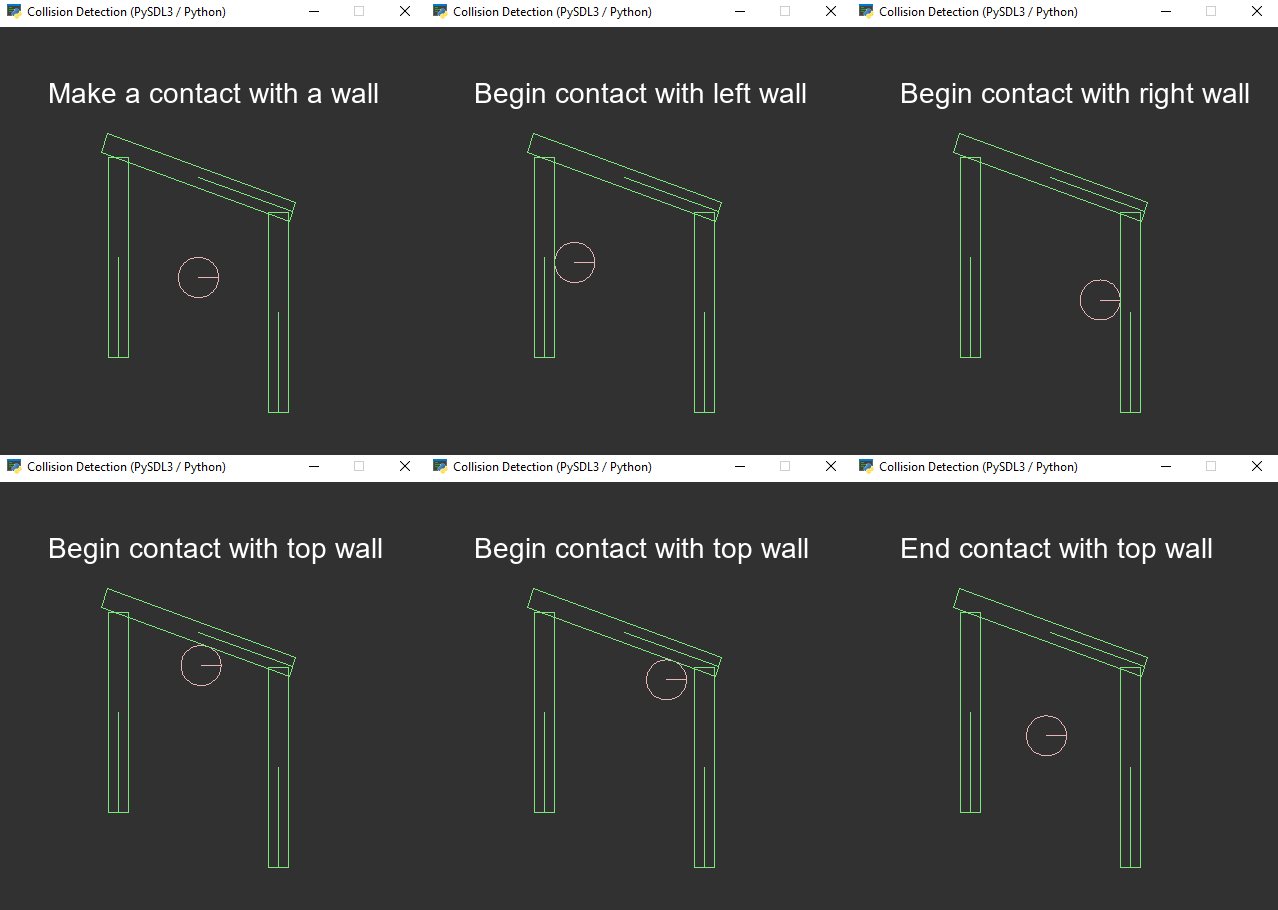
Collision Detection with Box2D in Python and C

This is a very basic but important example. It demonstrates how to render text using SDL3_ttf and how to detect collisions with Box2D.

Source code

collision-detection-pybox2d-2.3.10-pysdl-3.3.2-python

How to run (Python)

1. Install Python

Download and install Python 3 from the official website:

This project was tested with Python 3.12, but newer Python 3 versions should also work.

Make sure Python is added to your PATH during installation.


2. Install required packages

You can install specific versions (recommended for reproducibility):

pip install Box2D==2.3.10
pip install PySDL3==0.9.9b1

Or install the latest available versions:

pip install Box2D PySDL3

3. Run the project

  1. Open a terminal / Command Prompt
  2. Navigate to the project directory
  3. Run:
py main.py

(Optional) Troubleshooting

  • If pip installs packages for a different Python version, try:

    py -m pip install Box2D PySDL3
    
  • On some systems, you may need to use:

    python main.py
    

    instead of py main.py.


Example: Print SDL3 library versions

pip install PySDL3==0.9.9b1

Source code: GitHub repository

py main.py

Console output:

PySDL3 version:       0.9.9b1
Compiled SDL version: 3.3.2
Linked SDL version:   3.3.2
SDL3_image version:   3.2.4
SDL3_ttf version:     3.2.2
SDL3_mixer version:   3.1.0

The decorators can be deleted.

Use:

def SDL_AppInit(...):

def SDL_AppEvent(...):

def SDL_AppIterate(...):

def SDL_AppQuit(...):

Instead of this:

@sdl3.SDL_AppInit_func
def SDL_AppInit(...):

@sdl3.SDL_AppEvent_func
def SDL_AppEvent(...):

@sdl3.SDL_AppIterate_func
def SDL_AppIterate(...):

@sdl3.SDL_AppQuit_func
def SDL_AppQuit(...):

Like this:

main.py

import ctypes
import os

os.environ["SDL_MAIN_USE_CALLBACKS"] = "1"
os.environ["SDL_RENDER_DRIVER"] = "opengl"

import sdl3

renderer = ctypes.POINTER(sdl3.SDL_Renderer)()
window = ctypes.POINTER(sdl3.SDL_Window)()

def SDL_AppInit(appstate, argc, argv):

    # Init
    sdl3.SDL_Init(sdl3.SDL_INIT_VIDEO)

    # Create window
    title = "Example".encode()
    sdl3.SDL_CreateWindowAndRenderer(title, 350, 350, 0, window, renderer)

    # Turn on vertical sync
    sdl3.SDL_SetRenderVSync(renderer, 1)

    return sdl3.SDL_APP_CONTINUE

def SDL_AppEvent(appstate, event):
    ev = sdl3.SDL_DEREFERENCE(event)

    if ev.type == sdl3.SDL_EVENT_QUIT:
        return sdl3.SDL_APP_SUCCESS
    
    return sdl3.SDL_APP_CONTINUE

def SDL_AppIterate(appstate):
    sdl3.SDL_SetRenderDrawColor(renderer, 50, 50, 50, sdl3.SDL_ALPHA_OPAQUE)
    sdl3.SDL_RenderClear(renderer)
    # Draw here
    sdl3.SDL_RenderPresent(renderer)
    return sdl3.SDL_APP_CONTINUE

def SDL_AppQuit(appstate, result):
    # SDL will clean up the window/renderer for us

    pass

Tested with 0.9.9b1:

pip install PySDL3==0.9.9b1
py main.py